Designing File Selection & Review
Process Design Case Study
Multimedia Design | Motion Graphics | Visual Communication

Overview
This project was developed as part of my day-to-day work at Competitive Capabilities International. The brief was to create an explainer video that communicates how meeting performance can be improved through clearer processes.
The challenge was translating a fairly detailed script into something visual and easy to follow. I focused on breaking the process down into simple, understandable steps so the viewer could quickly grasp what’s happening and why.
The challenge was translating a fairly detailed script into something visual and easy to follow. I focused on breaking the process down into simple, understandable steps so the viewer could quickly grasp what’s happening and why.

Approach
I approached this by structuring the content into a clear sequence that mirrors how decisions are made in the process.
Rather than relying on abstract visuals, I focused on making each action obvious. Selection, movement, and state changes were used to show what’s being identified, what’s being acted on, and what happens next. The goal was to reduce friction for the viewer and make the flow feel intuitive.
Rather than relying on abstract visuals, I focused on making each action obvious. Selection, movement, and state changes were used to show what’s being identified, what’s being acted on, and what happens next. The goal was to reduce friction for the viewer and make the flow feel intuitive.
Planning & Storyboarding
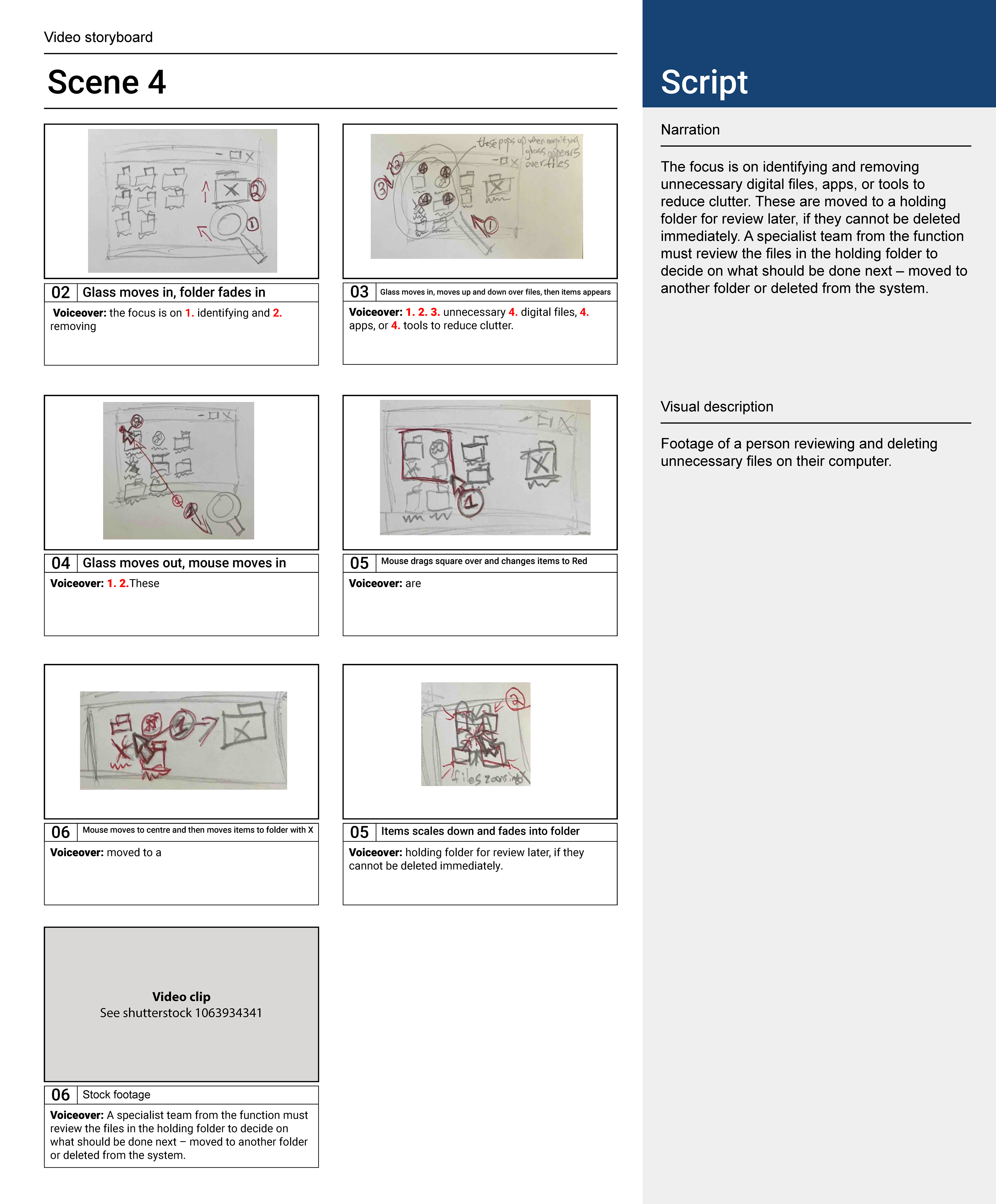
I developed a storyboard to map the script to specific visual actions.
Each frame represents a step in the process — from identifying unnecessary files, to selecting them, and then moving them into a holding space for review. This helped ensure that the visuals weren’t just illustrative, but directly supported the logic of the script.
It also allowed me to test how clearly each step would read before moving into animation.
Each frame represents a step in the process — from identifying unnecessary files, to selecting them, and then moving them into a holding space for review. This helped ensure that the visuals weren’t just illustrative, but directly supported the logic of the script.
It also allowed me to test how clearly each step would read before moving into animation.
Final Animation
The animation was built in After Effects, focusing on clarity and consistency throughout.
During development, I moved away from using a magnifying glass to represent analysis and instead introduced a clearer visual system using colour and icon changes. Folders and elements shift state when selected, making it immediately clear what’s being acted on without relying on additional visual metaphors.
Motion graphics were composited onto laptop footage, with assets refined in Illustrator to maintain a consistent visual language. The animation was timed closely to the voiceover to ensure each step in the process is easy to follow and understand.
Tools used: After Effects, Illustrator, Synthesia.
During development, I moved away from using a magnifying glass to represent analysis and instead introduced a clearer visual system using colour and icon changes. Folders and elements shift state when selected, making it immediately clear what’s being acted on without relying on additional visual metaphors.
Motion graphics were composited onto laptop footage, with assets refined in Illustrator to maintain a consistent visual language. The animation was timed closely to the voiceover to ensure each step in the process is easy to follow and understand.
Tools used: After Effects, Illustrator, Synthesia.